Accuracy
How to review an automatic transcript
Review the draft against the recording before you quote or rely on it. Prioritize mistakes that change meaning, then apply a clear editing convention to the rest.
Last checked:
Define what the transcript is for
A searchable personal note, a published interview and a research transcript do not need exactly the same editing treatment. Decide whether the output should preserve fillers and repetitions, read as clean prose, or support close analysis of the conversation. Write that convention down before making changes.
A readable transcript is not the same as a summary. Removing a repeated word may improve flow without changing meaning. Rewriting an uncertain answer into a confident conclusion does change meaning. Keep editorial notes and summaries visibly separate from the record of speech so the next reader can tell what was said and what you inferred.
Start with high-consequence details
Names, dates, amounts, units and negations deserve direct playback. A single error in one of those fields can matter more than several punctuation mistakes. Do not infer a name from how plausible it looks in the sentence. Check it against the recording and an appropriate authoritative source when needed.
Pay particular attention to corrections made by the speaker. An initial statement may be revised a moment later. If you copy only the first segment, you can preserve the recognized words while losing the actual conclusion. Listen around the passage you intend to use, not only to the isolated sentence.
| Review item | What to check | Why it matters |
|---|---|---|
| Names and terms | Spelling against audio and the correct source | Plausible text can still identify the wrong thing |
| Negation and correction | Listen to the surrounding exchange | A short omission can reverse meaning |
| Speaker labels | Evidence at each relevant turn | Correct words can be attributed incorrectly |
| Caption export | Timing, sounds and line treatment | A transcript is not a finished accessible caption file |
Use timestamps as review anchors
The app’s segment timestamps let you return to the recording from the draft. They are generated boundaries, not a guarantee of perfect alignment. If the beginning sounds clipped or a sentence seems to start mid-thought, listen slightly earlier in the media player.
Keep the source recording available throughout review. A transcript can be persuasive precisely because it is easy to read. When the text and your memory disagree, the source audio is the place to investigate. If the audio is unclear, preserve the uncertainty rather than resolving it with the model’s most fluent output.
Handle speaker turns manually
MurmurScribe does not identify speakers automatically. Add manual labels when the recording gives you enough evidence. If voices overlap or a distant participant is difficult to recognize, leave that turn uncertain until a competent reviewer can resolve it.
Speaker labels are not merely decorative. A correct sentence assigned to the wrong person can change the meaning of a meeting record or interview. Check the transition around each important quote. If the source contains separate microphone tracks, keep them for a workflow that can use that evidence, even though this app processes a mono mix.
Keep uncertain words visible
Use a consistent marker for unclear speech in a working document. Include a timestamp or nearby context so the issue can be reviewed efficiently. The marker should distinguish inaudible audio from a word you heard but cannot spell. Those are different problems with different possible resolutions.
Do not use a model rerun as the only arbiter. Another model can produce a different plausible guess without clarifying the source. Comparing drafts may help locate uncertainty, but listening and context remain necessary. For consequential material, seek the appropriate fluent or domain-qualified review.
Preserve the original draft or a version history when the project requires an audit trail. The browser editor saves current work; it is not a formal records-management system. Export and manage reviewed versions according to the needs of your project.
Prepare the export for the next person
For plain reading, choose TXT or DOCX and state the editing convention. For structured processing, keep the JSON segment fields. For captions, export SRT or VTT and perform a separate timing and accessibility pass. A corrected transcript is a good foundation, but it does not automatically include meaningful sound descriptions or suitable cue breaks.
Open the export and inspect it before handing it off. Confirm the file corresponds to the right recording and that manual speaker labels appear as intended. If the text will be published, review the exact passages that will be quoted rather than assuming an earlier general pass covered every later edit.
Keep reviewer comments outside the final transcript unless they are explicitly intended for the reader. A draft marked for clarification should not silently become a public record. The handoff is complete when the recipient can understand the text’s status, source and remaining limitations without reconstructing your editing session.
Worked example
Consider an illustrative draft that says, “We can release the file,” while the recording says, “We cannot release the file yet.” A small number of word edits reverses the practical meaning. The reviewer should correct the sentence, listen to the surrounding discussion and check who said it before copying it into a decision record. A find-and-replace operation is useful for a repeated spelling error, but it is not appropriate for context-dependent corrections such as this one. After editing, export the reviewed copy and keep any unresolved passage clearly marked for follow-up.
Open the local transcriber to test an authorized recording and review the draft against the sound.
Separate corrections from editorial interpretation
Maintain a clear distinction between fixing recognition and improving prose. Correcting a wrongly heard word aims to bring the draft closer to the recording. Combining sentences, removing qualifications or replacing a speaker’s phrasing with a summary introduces editorial judgment. Both can be useful, but they should not be presented as the same operation.
When another person reviews the document, give them enough context to understand that distinction. A source transcript can preserve the spoken sequence while a separate summary identifies themes or decisions. If the project permits a cleaned transcript, state the convention and apply it consistently. Avoid silently polishing only the passages that support a preferred interpretation.
Check replacement operations carefully. A repeated spelling correction can be efficient, but the same character sequence may appear inside another word or in a different context. Review the changed passages before exporting. The app’s literal find-and-replace is a convenience, not an understanding of the intended terminology.
Before a final handoff, read the text as someone who did not attend the recording. Look for ambiguous pronouns, unexplained manual labels and unresolved markers. Resolve what the source supports, and keep remaining uncertainty visible. Do not add facts solely to make a passage self-contained unless they are clearly marked as editorial context. The final document should make it possible to distinguish the speaker’s words, the reviewer’s corrections and the writer’s interpretation without having to guess how the transcript was produced.
Inside the transcript editor
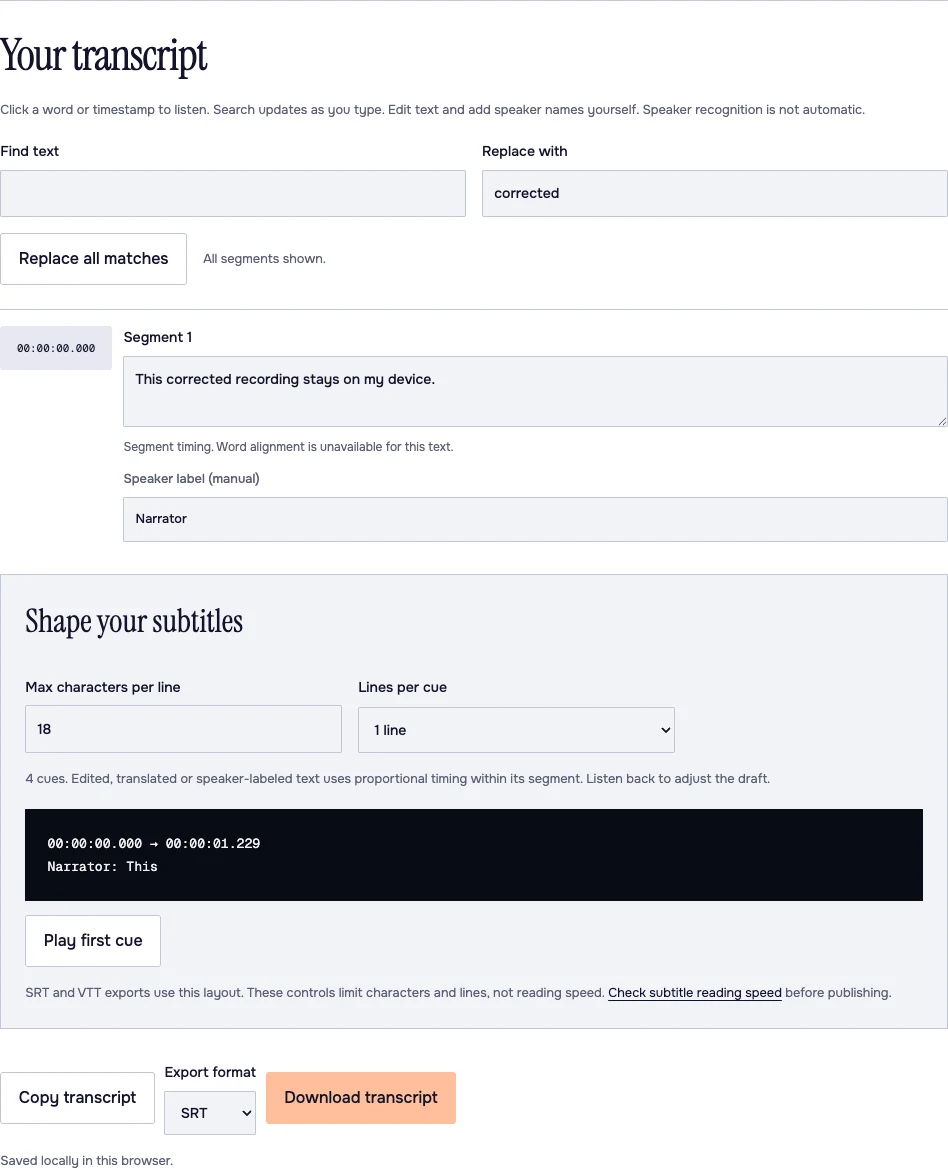
- Listen: the timestamp at the left seeks the recording.
- Correct: the central text field is editable; the speaker name below it was typed manually.
- Keep: select the export format at the bottom, then download the reviewed transcript.
Frequently asked questions
Can I rely on a fluent-looking sentence?
No. Speech models can produce plausible words that are not supported by the audio. Check passages you will use against the recording.
Should I remove filler words?
That depends on the stated transcription convention. A readable interview and qualitative analysis may need different treatment.
Are the speaker labels automatic?
No. MurmurScribe’s speaker labels are manual. Add them only when the source supports the attribution.
Sources
- Whisper paper, appendix tables and normalization method · OpenAI / Radford et al. · Checked 2026-10-30
- W3C prerecorded captions guidance · W3C WAI · Checked 2026-10-30
- YouTube subtitle import formats · Google / YouTube · Checked 2026-10-30